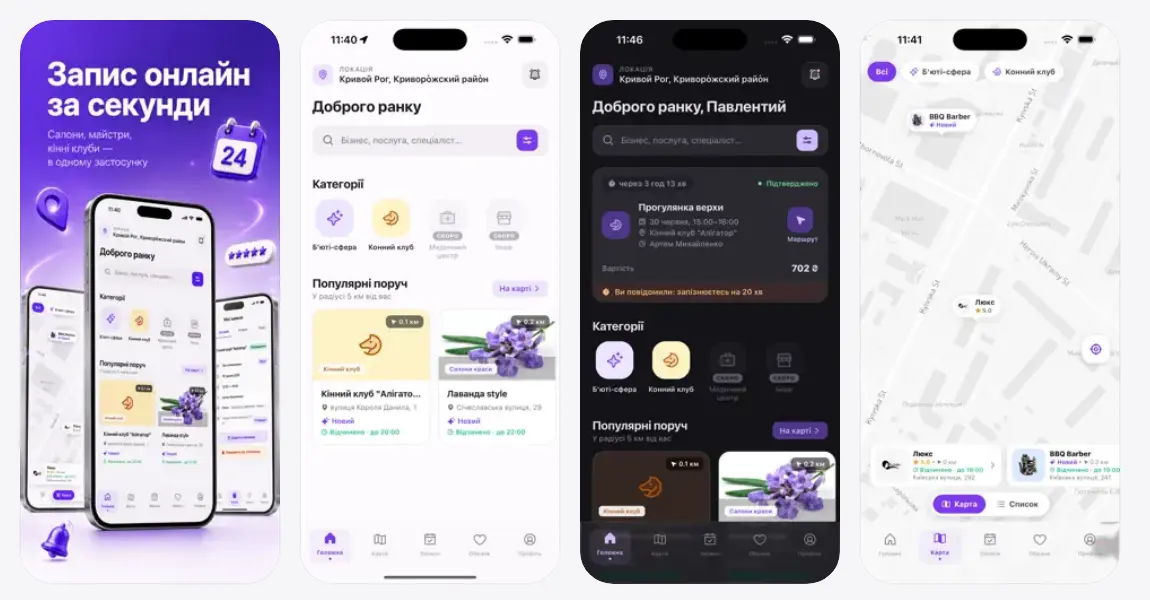
Two React Native apps on the Zapys24 API: one for the client who books, one for the business that runs the day. Both are published on the App Store and Google Play. These are the decisions that shaped them.
Two apps, not one app with a switch
A client and a salon owner share almost nothing: one browses, books and gets reminders; the other works a calendar, staff, clients and money all day. Putting both behind a role flag produces an app where half the navigation is always dead weight.
So they ship separately, against the same API. The client app leans on maps and search; the business app is a working tool with a calendar at its centre. Each store listing then describes one thing, which is also what review teams expect.
Finding a salon, not a list of salons
The client app puts the map first: device location, Mapbox rendering, and results tied to what is actually nearby rather than to a national list. Booking is a bottom sheet over the map, so choosing a time never costs the context of where the place is.
Push that earns its permission
Notifications go through Firebase Messaging on both platforms and are categorised on the server, so a reminder about tomorrow's appointment and a promotion are not the same subscription.
The permission prompt is asked for at the moment it makes sense — after a booking exists — not on first launch. An app that burns the prompt on launch loses the channel it actually needs.
Fast on a bad connection
Server state is cached by React Query, and what must survive a cold start is written to MMKV, which is fast enough to read synchronously while the first screen renders. Tokens live in the platform secure store, never in plain storage.
The result is that opening the app on mobile data shows yesterday's schedule instantly and corrects it a moment later, instead of showing a spinner.
What the stores demanded
In-app subscriptions are verified server-side against Apple's App Store Server library — the entitlement comes from the receipt, not from the device. Account deletion is reachable from inside the app and from the web, because both stores now require it.
Builds and submissions run through Expo, which keeps the native project out of the repository and the release process in one command.
The result
Two apps in production on the App Store and Google Play, sharing one NestJS backend with the web cabinet — clients book from the map, businesses run the day from the phone.